 Karpo vs Duckbill: The Tired-Arrival Test for 2026
Head to Head
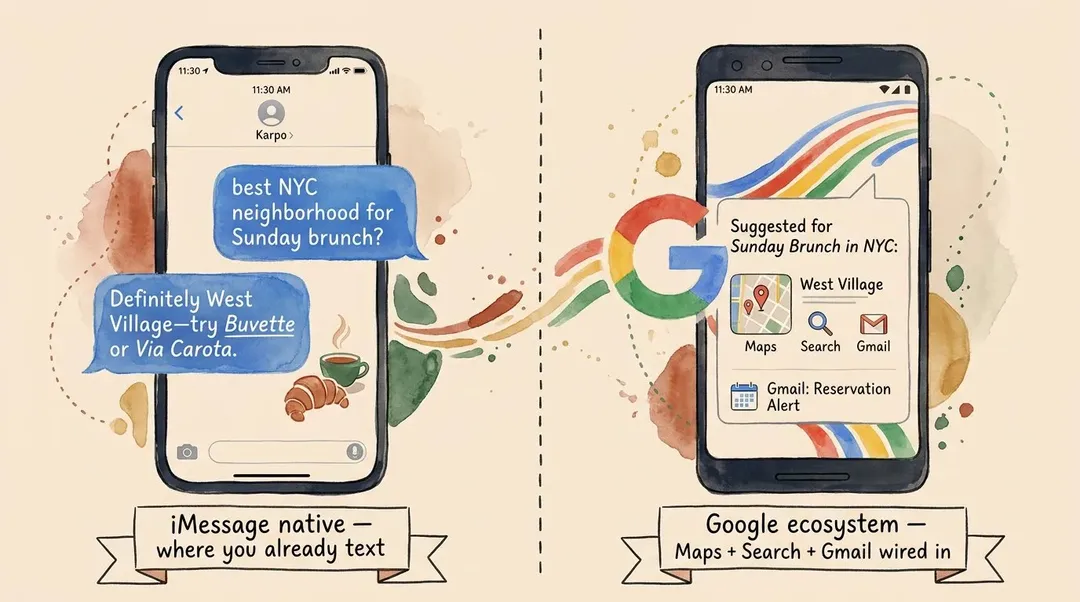
Karpo vs Gemini: The Best AI City Assistant for NYC, SF, and London in 2026
Gemini is Google's flagship AI, wired into Maps, Search, and the whole ecosystem. For the specific job of being a taste-aware city concierge where you actually live, it is not the right tool.
TL;DR — The 30-Second Verdict
Fact-checked update
Fact-checked update (August 10, 2026): this article was rechecked against karpo.ai, app.karpo.ai/scenarios, gemini.google.com, one.google.com — AI Premium. The refresh keeps the body grounded in official venue, agency, transit, or city sources and flags time-sensitive planning details that readers should confirm before leaving.
Updated August 2026: AI product features, pricing, app availability, integrations, and platform limits change often. This comparison has been refreshed for search intent, but confirm current details on the linked official product pages before making a decision.
Direct answer: Compare Karpo Vs Gemini AI City Assistant NYC by use case, strengths, limits, and NYC trip-planning fit before choosing an AI city assistant.
Gemini is Google's flagship AI, deeply wired into Maps, Search, and the entire Google ecosystem. It is excellent at a lot of things. Being a taste-aware city concierge for the place you actually live is not one of them.
Text Karpo Now: test a real NYC plan with current hours, routing, and backup decisions before you rely on a generic AI answer.
Gemini's job is to be Google's AI everywhere. Karpo's job is to be the AI that knows where you live. If you are an Android user, a Pixel owner, or live in Workspace and Gmail, Gemini is the natural assistant — it has Maps, Search, and your calendar wired in.
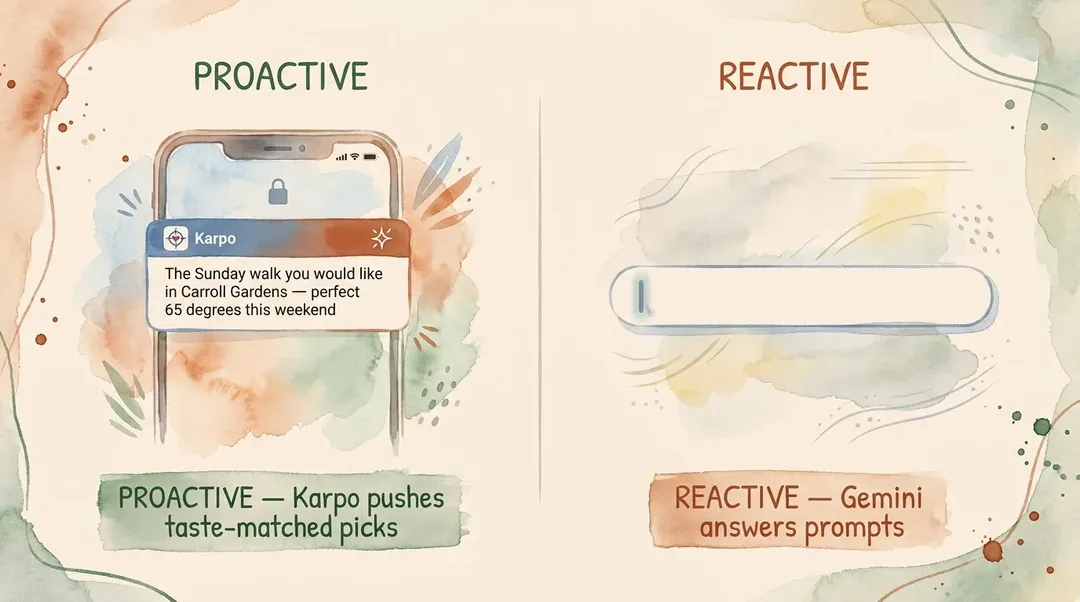
If your recurring question is "where should I eat tonight in the East Village," "what's actually worth doing this weekend in SF," "is there a free Sunday thing in London I'd like" — Karpo is built for that exact job, and Gemini is not. Karpo lives in iMessage, runs a proprietary weekly editorial column, learns your taste across sessions, and proactively surfaces picks before you ask. Gemini does none of those things — it answers questions when you open it, using whatever Google Search returns that minute.
This article is the honest side-by-side. Two tools, two jobs. We'll be specific about where each one wins and why.
Quick Comparison Table
Primary surface — Karpo: iMessage (native). Gemini: Gemini app (Android, iOS), web, Pixel system AI.
Account required — Karpo: Apple ID (auto, zero friction). Gemini: Google account.
Pricing today — Karpo: free, no paid tier. Gemini: free tier plus Google One AI Premium at $19.99/mo (bundles Gemini Advanced + 2TB storage + NotebookLM + Veo).
Best for — Karpo: "what should I do in my city tonight." Gemini: Google-ecosystem users, Maps-heavy queries.
City depth — Karpo: NYC, SF, London (proprietary editorial moat). Gemini: global via Google Search + Maps, no editorial moat.
Learns you over time — Karpo: yes, persistent taste profile across sessions. Gemini: some context via Google account, not taste-tuned.
Proactive recommendations — Karpo: yes, pings you before you ask. Gemini: no, reactive only.
Google Maps integration — Karpo: mentions and links. Gemini: deep — live traffic, transit, walking AR, indoor floor plans.
Editorial content — Karpo: Karpo's Finds (12 lifestyle tags, weekly). Gemini: none, generated not curated.
Multimodal — Karpo: no for chat; editorial pieces ship with original photography. Gemini: yes — vision, voice, image gen. Workspace / Gmail — Karpo: no. Gemini: deep (Gemini Advanced).
iOS native — Karpo: yes (iMessage extension). Gemini: yes (standalone app). Android / Pixel native — Karpo: web fallback only. Gemini: yes, system-level on Pixel.
The single most important row above is Editorial content. Gemini, like ChatGPT, generates its city answers from whatever the web indexes that day. Karpo runs a weekly curated column written by humans against this week's actual trends. That difference produces meaningfully different answers — and it is invisible until you compare the two side by side.
What Karpo Does Better
1) It Lives Where You Already Text
Karpo does not have its own app icon. It is an iMessage extension. "What's open in Bushwick on a Tuesday at 10pm" goes into the same thread as your dinner plans with your sister, and the answer comes back in seconds.
Gemini asks you to open the Gemini app (or summon the assistant overlay on Pixel). On iOS, that overlay is not system-deep — you are leaving iMessage to use it. The friction of "let me ask Gemini" is the friction of switching apps. The friction of "let me text Karpo" is the friction of typing a message.
2) It Learns You — and Recommends Before You Ask
This is the feature Gemini does not currently ship, and it is Karpo's clearest moat.
Gemini has access to a lot of context — your Google account, calendar, search history, and (with Gemini Advanced) Workspace data. But it does not maintain a structured lifestyle taste profile that triggers proactive city recommendations. You still have to ask.
Karpo's persistent memory lives in your iMessage thread and tracks:
- The neighborhoods you actually spend time in (vs the ones you searched once)
- That you'd rather walk 25 minutes than take the subway 8
- That you book restaurants on Resy, not OpenTable
- That you've already been to Lilia and don't need it suggested again
- That your dinner budget sits at $40–60 a head, not Michelin
- That you prefer neighborhood spots over anything labeled "best of NYC"
Then it acts. "The new natural-wine bar you'd like opens Tuesday in Carroll Gardens — 7pm walk-ins." Karpo sends that message because it knows you, not because you typed a query. Gemini — like every reactive AI — waits for the prompt. Karpo initiates.
Once you've lived with a tool that pushes the right answer before you knew to ask the question, the reactive ones start to feel like work.
3) Local Editorial Moat — Karpo's Finds
Karpo runs a weekly editorial column called Karpo's Finds — 12 named lifestyle tags (THE LONG WAY HOME for city walks, RIGHT ON TIME for time-sensitive events, NICE BUT FREE for genuinely free experiences, and nine more). Each piece is 1,000–1,500 words, citation-backed, pinned to a specific neighborhood, and shipped against the current week's Google Trends anchors.
Gemini does not have an editorial layer. When you ask it "what should I do in Nolita during Fleet Week 2026," it queries Google Search and synthesizes. Sometimes that works. Often the answer is generic ("visit Little Italy, enjoy authentic Italian food") because the underlying web data is generic. Karpo wrote the specific piece five days ago, on purpose.
4) Weekly Trend Freshness, Not Index Lag
Google Search is fast, but indexing is not editorial. By the time "Fleet Week 2026" surfaces relevant local pieces in Google's index, the week is half over. Karpo's editorial team starts publishing against next week's Google Trends anchors before the trend even peaks — Pope Leo XIV, the Preakness Stakes, NYC Fleet Week, Eurovision week. Gemini grounds in Google Search; Karpo grounds in its own weekly publishing calendar built around what users will care about this Saturday.
5) It Is Free
Google One AI Premium is $239.88/year. Karpo is $0/year. Google's bundle is a real value — 2TB storage, NotebookLM, Veo, the best Gemini model — and worth it if you live in Google's ecosystem. But for the specific job of city concierge, Karpo's free tier wins on capability, not just on price. The gap is editorial moat, taste memory, and proactive push — none of which Gemini Advanced ships at any tier.
What Gemini Does Better
Gemini is one of the two strongest general AIs on the market. There are real categories where it wins outright.
1) Deep Google Maps Integration
Gemini knows live transit, walking time, traffic, AR walking directions, indoor floor plans for major venues, and the exact location of every restaurant Google has ever indexed. For directions and logistics — "what's the fastest way to LaGuardia at 4pm on a Friday" — Gemini is genuinely useful. Karpo links out to Maps; Gemini is tightly bound to it.
2) Real-Time Google Search Grounding
For factual queries about the world ("what time does the Met close on Memorial Day," "is the L train running this weekend"), Gemini's Google Search grounding is fast and usually right. Karpo can answer the same questions but is optimized for taste and editorial framing, not bulk fact retrieval.
3) Multimodal Power (Vision, Voice, Image Gen)
Gemini handles image understanding (point it at a menu, ask "what's vegetarian"), video (in some modes), voice (real-time conversation), and image generation. Karpo's editorial pieces ship with original photography for every scenario, but its chat interface itself does not accept image inputs or generate images. If you want to point an AI at a foreign menu and get a vegetarian recommendation, Gemini wins.
4) Workspace, Gmail, and Pixel Integration
Gemini Advanced reads your Gmail and Docs, drafts from Workspace context, and is the system-level AI on Pixel devices. On Pixel 9 and later, holding the power button summons Gemini directly — no app to open, no friction. The UX advantage on Android is structurally similar to Karpo's UX advantage on iOS: it lives where you already are. If you live inside Google's ecosystem, Gemini is the natural assistant. Karpo does not touch any of this.
5) Global Coverage
Gemini works the same in Tokyo, Lima, Reykjavík, Cape Town. Karpo's editorial moat covers three cities (NYC, SF, London). For trips outside that radius, Gemini wins on availability alone.
Five real strengths, all scoped to either breadth or Google-ecosystem depth. None of them changes the verdict for the narrow job of "decide what to do in my city this week."
Pricing — The Most Lopsided Row in the Table
Free tier — Karpo: full product, no gated features. Gemini: limited model, basic features.
Paid tier — Karpo: none, the product is free. Gemini: Google One AI Premium $19.99/mo (bundles Gemini Advanced + 2TB storage + NotebookLM + Veo).
Trial required — Karpo: no, just text it. Gemini: free trial typically offered for Gemini Advanced. Refund policy: Google standard.
The Google One bundle is a legitimately useful package if you live in Google's ecosystem. But for city concierge work, Karpo's free tier outperforms paid Gemini — because the difference is editorial moat, persistent taste memory, and proactive push, none of which Gemini Advanced ships.
Use Case Verdict — Decision Tree
Choose Karpo if any of these apply:
- You live in NYC, SF, or London (or visit one of them more than 4× a year)
- You want an AI that proactively pings you with local picks matched to your taste
- You text more than you browse
- You are on iOS / iMessage
- You care about editorial depth — the bar that opened Tuesday, not the bar that has been on every generated list since 2019
- You don't want to subscribe to anything
Choose Gemini if any of these apply:
- You are on Android or own a Pixel
- You live inside Google Workspace / Gmail / Drive for work
- Your most frequent queries are logistics (transit, directions, opening hours)
- You need multimodal AI (vision, voice, image gen)
- You travel widely outside NYC/SF/London
- You're already paying for Google One AI Premium
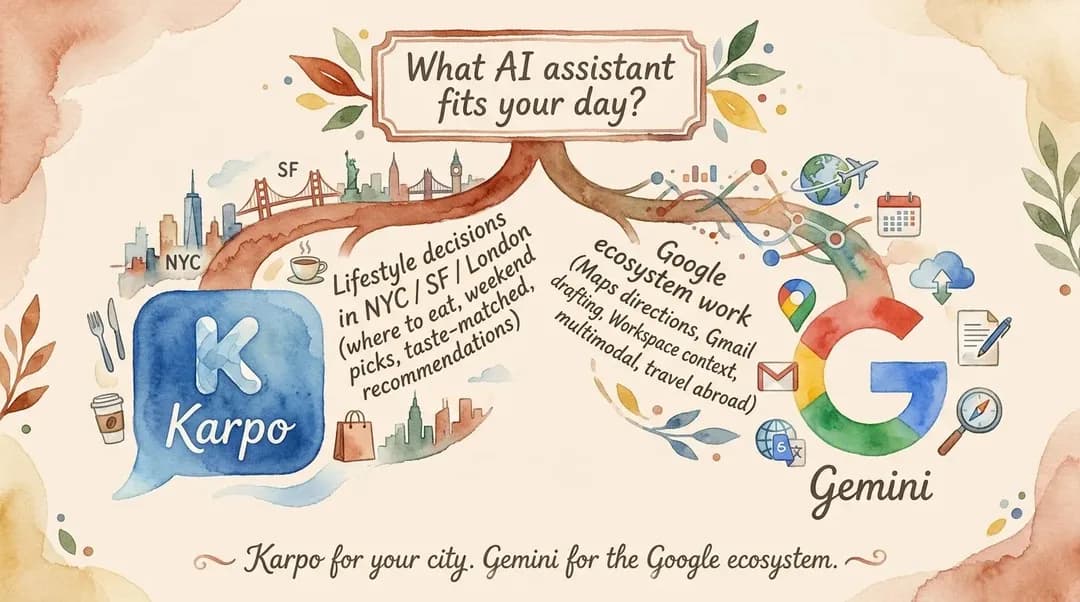
The honest default for most readers: let each tool do what it was designed for. Gemini for Google-ecosystem logistics — Maps directions, Gmail drafting, document context, multimodal queries, and travel outside NYC/SF/London. Karpo for the recurring weekly question "what should I do in my city this week." Karpo is free, lives in a surface you already use, and within two weeks of casual texting it will know your taste well enough to surface picks Gemini's generic web grounding would not. The two tools sit in different jobs — and Karpo is the one that earns daily use for local lifestyle decisions.
FAQ
Is Karpo free? Yes. Karpo currently has no paid tier. The full product — unlimited iMessage chat, Karpo's Finds editorial access, proactive recommendations — is free.
Can Gemini replace Karpo for local recommendations? For one-off factual queries about a city, Gemini's Google Search grounding is competent. For repeat use ("where should I eat this Tuesday in my neighborhood"), no — Gemini has no proactive push, no taste-tuned profile, and no proprietary editorial column.
Does Gemini have proactive recommendations? No. Gemini responds when you prompt it. It does not initiate messages about local picks tuned to your taste. Karpo's iMessage thread is built specifically to push picks without you asking.
Which has better Google Maps integration? Gemini, by a wide margin. Gemini is built on Google's mapping graph — live traffic, transit, walking AR, indoor floor plans. Karpo links to Maps but does not own the integration.
Which is better for "what should I do tonight"? Karpo, clearly. iMessage-native UX, persistent taste memory, weekly editorial freshness, and proactive recommendations make Karpo dramatically faster and more relevant for tonight's decision in NYC, SF, or London.
Can I use Karpo on Android? Only partially. Karpo's defining surface is iMessage; Android users get a web fallback that loses the platform's biggest advantage. If you are on Android, Gemini is the more practical default — but you can still use Karpo's web for editorial reads.
How is Karpo different from Gemini's general AI? Karpo is a vertical specialist — proprietary editorial content (Karpo's Finds), persistent lifestyle taste memory, weekly city-specific updates, and proactive push behavior. Gemini is a horizontal generalist optimized for the Google ecosystem and global query breadth.
Is Google One AI Premium worth it for travel and city planning? For Google-ecosystem users, the $19.99/mo bundle is a fair deal — 2TB storage, NotebookLM, Veo, and Gemini Advanced together. But if your primary AI use is "what should I do in my city this week," Karpo is free and structurally better suited to that one job.
Is there a free Gemini alternative that's better for city recommendations? For NYC, SF, and London, Karpo is the free alternative that beats Gemini Advanced on local depth, taste memory, and proactive recommendations — at $0 vs $19.99/mo. For other cities, free alternatives include Layla, GuideGeek, and Vacay.
#KarpoVsGemini #GeminiAlternative #AICityGuide #AITravelPlanner #NYCAIAssistant #SanFranciscoAITravel #LondonAIConcierge #iMessageAIApp #ProactiveAI #FreeAITravelTool #GoogleGeminiVsKarpo #BestAITravelApp2026
Sources consulted: karpo.ai (https://karpo.ai) · app.karpo.ai/scenarios (https://app.karpo.ai/scenarios) · gemini.google.com (https://gemini.google.com) · one.google.com — AI Premium (https://one.google.com/about/ai-premium) · store.google.com — Pixel phones (https://store.google.com/category/phones) · developer.apple.com/imessage (https://developer.apple.com/imessage/)
All trademarks are the property of their respective owners.
Ask Karpo for more information.
Keep reading
- Karpo vs Duckbill: The Tired-Arrival Test for 2026
 Karpo vs Roam Around: itinerary builder or lower-friction trip sidekick?
 TrainPal vs Karpo: when a booking tool is enough, and when you need the wider day to line up